

Getting Started with Bitcoin Payments and ‘Pay With Flash’: A Quick Starter Guide

Are you interested to learn more about all the hub-bub around Bitcoin and how you can start earning or accepting payments right away?
What if there was an All-in-One Bitcoin & Lightning Payment Platform?
Now, there is!
In this quick guide, I’ll walk you through Flash, an all-in-one Bitcoin and Lightning payment platform. It was just released this year in version 2.0.
These tools make it easier than ever for creators, businesses, and beginners to dive into the Bitcoin economy.
Create an account and connect a wallet
First you need to create an account. Head over to paywithflash.com and sign up. You have to provide and email address and password. Then a few questions about your business will be asked but you can enter any information you like.

This was my experience with the onboarding, I get to this home page and see their content and instantly really feel like this is a very consumer-friendly brand for both small businesses and enterprises alike in a mainstream landing page:

Like wow, that is a great first contact experience so far!
First Steps on Pay with Flash
What’s cool about this industry is there are so many tools and learning how some of them work, and very feature-rich ones like this is exciting.
Especially because of how empowering, versatile, and interoperable the Lightning Network is.
This platform is set up already to rival any other experience and accomplish so many things at once you might ever need for a business and to invoice others.
Of course, software and UI/UX may change over time, this is from August-September 2025, but I would say it does hand hold you in a very non-negative way.
Some of this stuff could be complicated for individuals new to Bitcoin, but this platform is set up already to rival any other experience and accomplish so many things at once you might ever need for a business and to invoice others.

First you create your profile, it’s nice and welcoming and has some cool default profile photos to choose from.
I’ll try not to get anyone wrong here but these are industry leaders and notable individuals featured from left to right:
Adam Back, Michael Saylor, Jack Dorsey, Lyn Alden, and Max Keiser.
That is a great touch showing some great acumen already, we go on to our dashboard with easy-to-access features that seemed to streamline so much of what can be a hurdle setting up separately in other platforms on the left tab:

Once you completed the onboarding flow, you can dive into the different features and explore the dashboard. You’re almost ready to start using Flash for your own business.
Connect your own wallet
Before you can use Flash, you need to connect a wallet. Flash needs to be connected to an external wallet, as the platform runs fully self-custodial. That means you need to bring your own wallet. For now, only wallets that support Nostr Wallet Connect are supported. And Flash also offers their own NWC compatible Lightning Wallet.
This simplicity, and succinct communication of these things is impressive, and how it guides you. The explanations are easy to grasp for non technical users.

I opted for my own wallet to see the experience further. An easy wallet to connect is Coinos.io but bear in mind it’s custodial.
I chose Alby Hub and my existing lightning wallet to connect:

Depending on the wallet you choose, you could experience some bugs. If something doesn’t work, just open the chat window and they’ll get back to you within 24h.
NWC is relatively new and not all wallets support it yet. Thankfully, I already have Alby Hub running on my Umbrel so provided my details from there running locally on that machine:

From there, I was already up and running after simply logging in, but now I have my own Alby account connected to, wow!
This feels like a game-changer. Especially with its easy onboarding and mainstream appeal, what do you think? Alby just runs in your browser as an extension too, go check them out meanwhile, it is also a very user-friendly experience.
From here you can make it a daily driver or consider how easy they make spinning up your payment accepting features. Or even build your own online shop from scratch:
By the way, Alby has a paid option where they do the channel management for you – it costs about $12 a month. But if you like you can also opt to manage your own lightning channels.
It has an amazing breakdown of how a lightning channel works, and does it for you if you want:

If you want to go “hardcore”, definitely check this comprehensive guide by DarthCoin.
Flash Payment Features
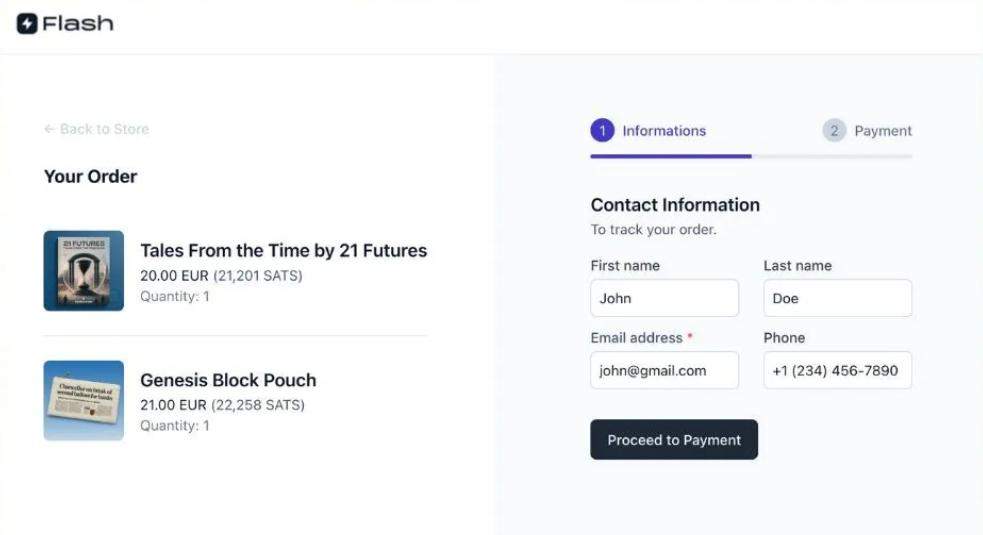
Once you connect your wallet, you can use Flash to accept bitcoin payments. There are many ways of doing so:
- Invoices: Flash lets you setup invoices and you can send neat PDF invoices with a payment link built in. Great for freelancers who work in bitcoin.
- Stores: You can create an entire storefront and sell things online
- Plugins: Flash also offers WooCommerce and Shopify plugins so you can add bitcoin payment options to your existing ecommerce shop
- Pay links: Send someone a link and get paid, easy!
- Paywall: Sell premium content on your website
- Donations: Raising for a good cause? Flash makes it easy.
- Point of Sale: You can give your staff a POS, either as an app on a device or the physical handheld POS Flash offers.
- API: Flash also provides API documentation and you can build custom solutions
With flash you get an entire toolset of payment features and the best is, many are offered free. Invoicing for instance is completely free and no fees are charged for using it (at date of writing).
Features like paywall and payment link allow anyone to accept bitcoin payments with ease.

Whether you want to just try some things out or fully integrate bitcoin into your business, Flash, is a powerful option that makes it easy to get started.
If you want to leave feedback and connect with the team, the founder Pierre Corbin is very active on Twitter and Linkedin and welcomes any questions and ideas.
To network effects, cheers⚡🥂